


Marking obstacles
When there are obstacles in your field, you can mark their position. In this way, you will always receive a warning before any collision can occur.
You can mark obstacles while working in a field.
You will be warned of an obstacle in the following cases:
- ▪
- If the obstacle will be reached in 20 seconds or earlier.
- ▪
- If the distance between the obstacle and the vehicle is smaller than the working width of the agricultural device.
The warning always consists of two elements:
- ▪
- A graphical warning in the upper left-hand corner of the work screen
- –
- "Field boundary"
- –
- "Obstacle"
- ▪
- Acoustic signal


Obstacles


Procedure
- þ
- You have now started a navigation.
 - Press.
- ⇨
- The following screen will appear:
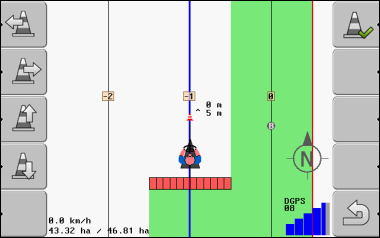
The screen shows a schematic representation of vehicle with driver, obstacle and distance between obstacle and GPS receiver.
- 3.
- Set the distance between the obstacles and tractor point by using the arrows.
As TRACK-Leader knows the position of the tractor, it can calculate the obstacle position in the field.
- ⇨
- The obstacle now appears on the work screen.
Further information